มีอะไรใหม่ใน Autodesk AutoCAD Electrical 2017
1. Microsoft® SQL™ Server Support for Catalog Data
- AutoCAD Electrical 2017 สามารถที่จะ migrate จากฐานข้อมูล Microsoft Access-based catalog and footprint databases ไปยัง SQL Server ได้
- เมื่อทำการติดตั้ง AutoCAD Electrical 2017 สามารถเลือก Option ในการ configure SQL Server ได้ขณะติดตั้ง

2. AutoCAD Electrical and Inventor Combined Bill of Material Report
- สามารถเชื่อมต่อข้อมูล Bill of Material ใน Autodesk Inventor และ AutoCAD Electrical 2017 เข้าด้วยกัน ซึ่งทำให้สามารถ generate Report โดย Include Inventor Parts มาด้วย
- ในส่วนของการ generate Report สามารถ ที่จะเลือกเอา Inventor parts เข้ามาออก report ได้ทั้ง Schematic และ Panel

3. Ignore Errors in Electrical Audit
- เมื่อมีการตรวจสอบข้อผิดพลาดในการเขียนแบบไฟฟ้า (Electrical Audit) สามารถเปลี่ยน status ในหัวข้อนั้นๆ โดยสามารถเลือกที่จะ ยอมรับ หรือ ละเว้นได้
- แสดงสถานะ "Ignored" ในช่องของ status ให้เห็น
- Error status จะถูกแสดงให้เห็น ตลอด เมื่อมีการตรวจสอบข้อผิดพลาดในการเขียนแบบไฟฟ้า

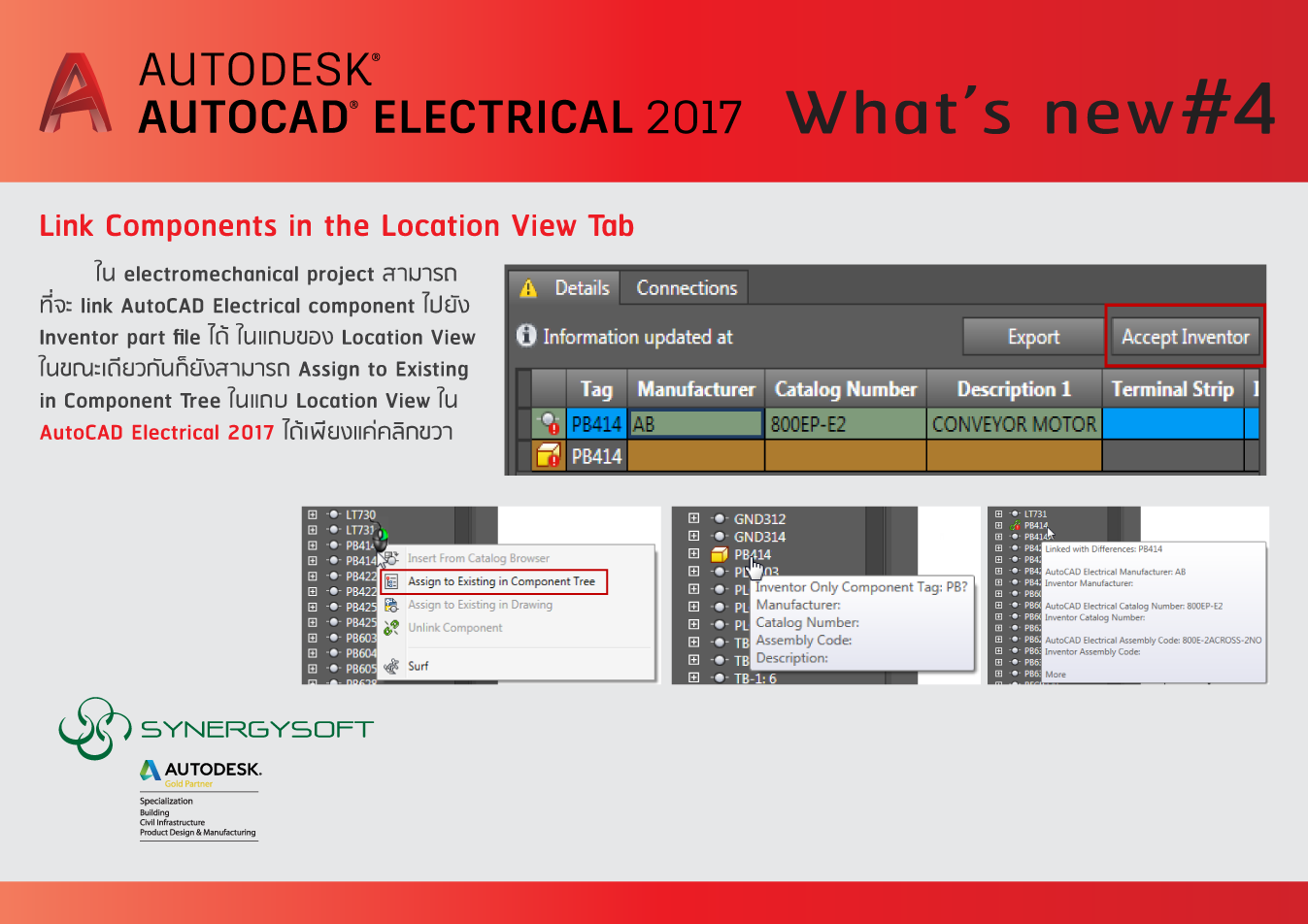
4. Link Components in the Location View Tab
ใน electromechanical project สามารถ ที่จะ link AutoCAD Electrical component ไปยัง Inventor part file ได้ ในแถบของ Location View ในขณะเดียวกันก็ยังสามารถ Assign to Existing in Component Tree ในแถบ Location View ใน AutoCAD Electrical 2017 ได้เพียงแค่คลิกขวา
5. Insert and Link Connector in the Location View Tab
ถ้าในไฟล์ประกอบใน Autodesk Inventor electromechanical project มีการใส่ Connector ไว้ ใน AutoCAD Electrical 2017 ก็จะสามารถใส่ Connector ได้เลย ในแถบของ Location View

6. Insert Footprint from Catalog Browser
สามารถใส่ panel footprint ใน Catalog Browser ได้เลย
> โดยปกติ Panel footprint จะอยู่ใน Catalog lookup database แต่ใน 2017 สามารถ Insert footprint จาก Catalog Browser ได้เลย โดยโปรแกรมจะหา footprint ที่ต้องการให้ เพิ่มความสะดวกในการค้นหาได้เร็วขึ้น

7. Item Number Balloon Update
> กรณีมีการสร้างบอลลูนใน Panel drawing แล้วมีการแก้ไข Panel Drawing Configurationโปรแกรมจะ Update บอลลูนให้อัติโนมัติ โดยไม่ต้องสร้างใหม่

8. Miscellaneous Enhancements
> ปรับปรุงให้ดีขึ้นในส่วนของ การจัดเรียงลำดับ ตามตัวอักษร ในส่วนของ Terminal Strip Table Generator ได้เพียงแค่คลิกที่หัวตาราง
> ใน Project Level Node ในแถบของ Location View สามารถดูรายละเอียด อุปกรณ์ในแถบของ Location View ได้ และสามารถ export Details project และ Connections panels ได้

ติดตามฟีเจอร์ใหม่ๆ ใน Autodesk AutoCAD Electrical 2017 ได้อีกเร็วๆ นี้